Business Process Automation · Operations

Small Service Business Operations System

A connected automation system that moves a service business from first inquiry to owner reporting—reducing repetitive administration while preserving approval gates and traceable business state.
  • n8n
  • Supabase PostgreSQL
  • REST APIs
  • Webhooks
  • Gmail
  • Google Calendar
  • Scheduled Workflows
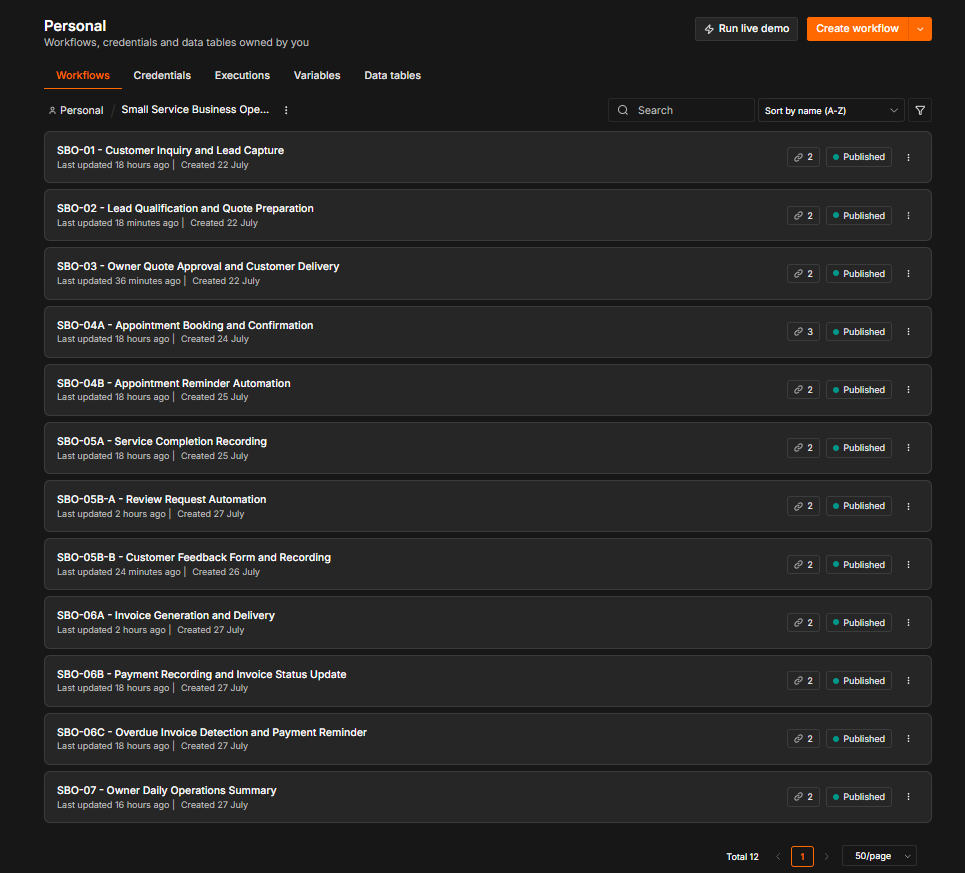
Sanitized n8n project overview showing twelve published Small Service Business Operations workflows
Twelve published lifecycle workflows shown with sanitized public demonstration data.
12Lifecycle workflows
10Relational data tables
1Central failure monitor
HumanApproval where judgment matters
01 — Business problem
Where service operations lose time

Fragmented tools turn routine work into manual coordination.

Small service businesses often move customer work across email, spreadsheets, calendars, messaging applications, and staff memory. The work is necessary, but the repeated handoffs make the operating state difficult to follow.

01 — Intake

Customer information is fragmented

Inquiries arrive through disconnected channels, leaving staff to re-enter details and reconstruct context before work can begin.

02 — Quotations

Preparation and approval are manual

Quote details, owner review, customer delivery, and lead status can drift when each step depends on a separate message or spreadsheet update.

03 — Scheduling

Appointments require repeated checks

Availability, confirmation, calendar creation, and reminders create ongoing coordination work for staff.

04 — Billing

Invoices and payments need follow-up

Late invoicing, untracked balances, and inconsistent reminders make it harder to understand what is outstanding.

05 — Visibility

Exceptions surface too late

Owners may not see missed follow-ups, overdue invoices, low reviews, or failed automations until the problem has already affected operations.

02 — Solution overview
One connected operating lifecycle

Business state moves forward through structured workflows.

Each workflow owns a defined stage, validates its inputs, updates the shared operational record, and hands the next action to automation or the owner as appropriate.

  1. Inquiry
  2. Quote preparation
  3. Owner approval
  4. Appointment
  5. Reminder
  6. Service completion
  7. Invoice
  8. Payment follow-up
  9. Review
  10. Owner reporting

Automation handles

  • Normalized intake and required-field validation
  • Structured record creation and status updates
  • Confirmations, reminders, invoices, and follow-ups
  • Scheduled checks, daily summaries, and failure alerts

People retain

  • Owner quotation approval or rejection
  • Service judgment, exception handling, and customer care
  • Operational decisions that require context
  • Review of alerts, overdue work, and follow-up priorities
04 — Workflow evidence
Sanitized public proof

Six views across the operating lifecycle.

The screenshots below demonstrate business outcomes at key stages. Full-resolution links are provided so tall email and operational views remain readable without aggressive cropping.
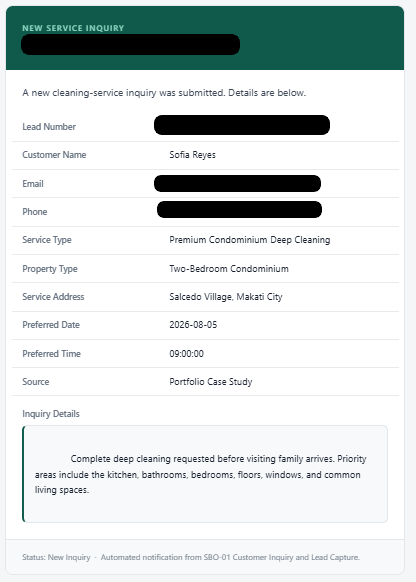
Sanitized new service inquiry email with required service details and customer contact fields redacted
Customer inquiry capturedA structured intake record gives the owner the service type, property context, preferred schedule, and inquiry details without relying on a chat thread.Open full-resolution evidence
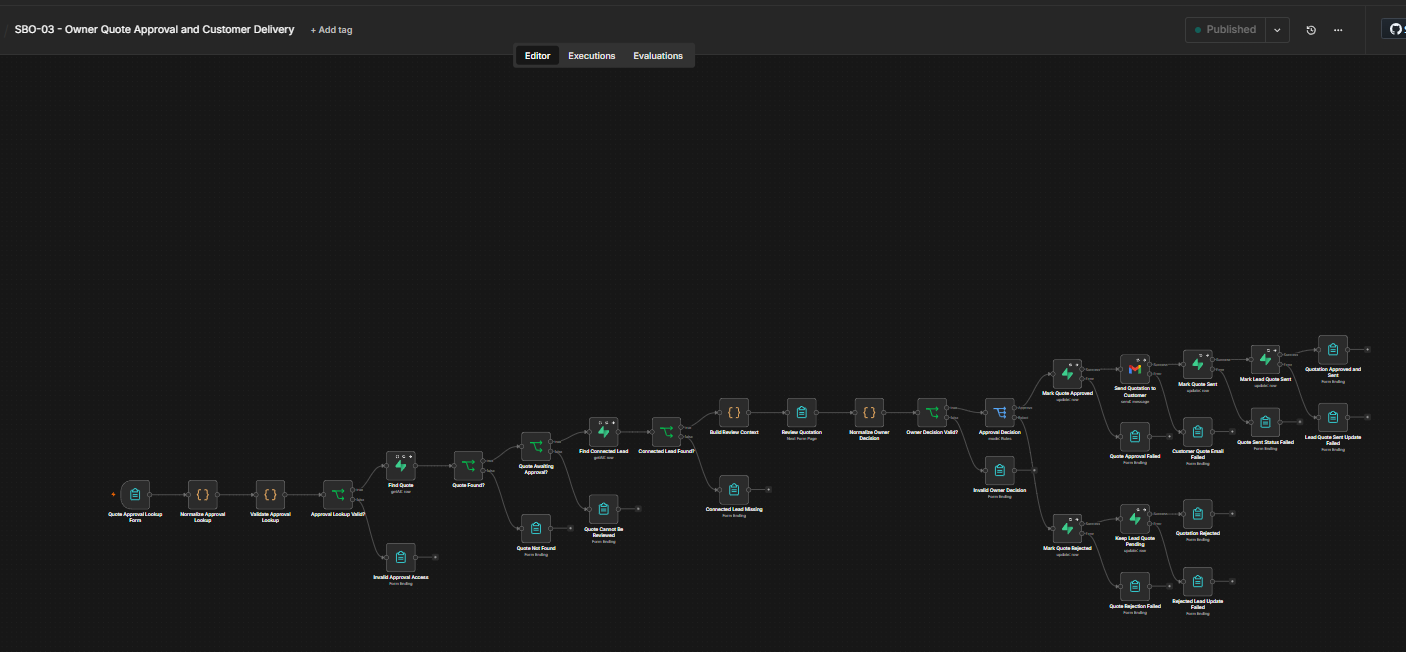
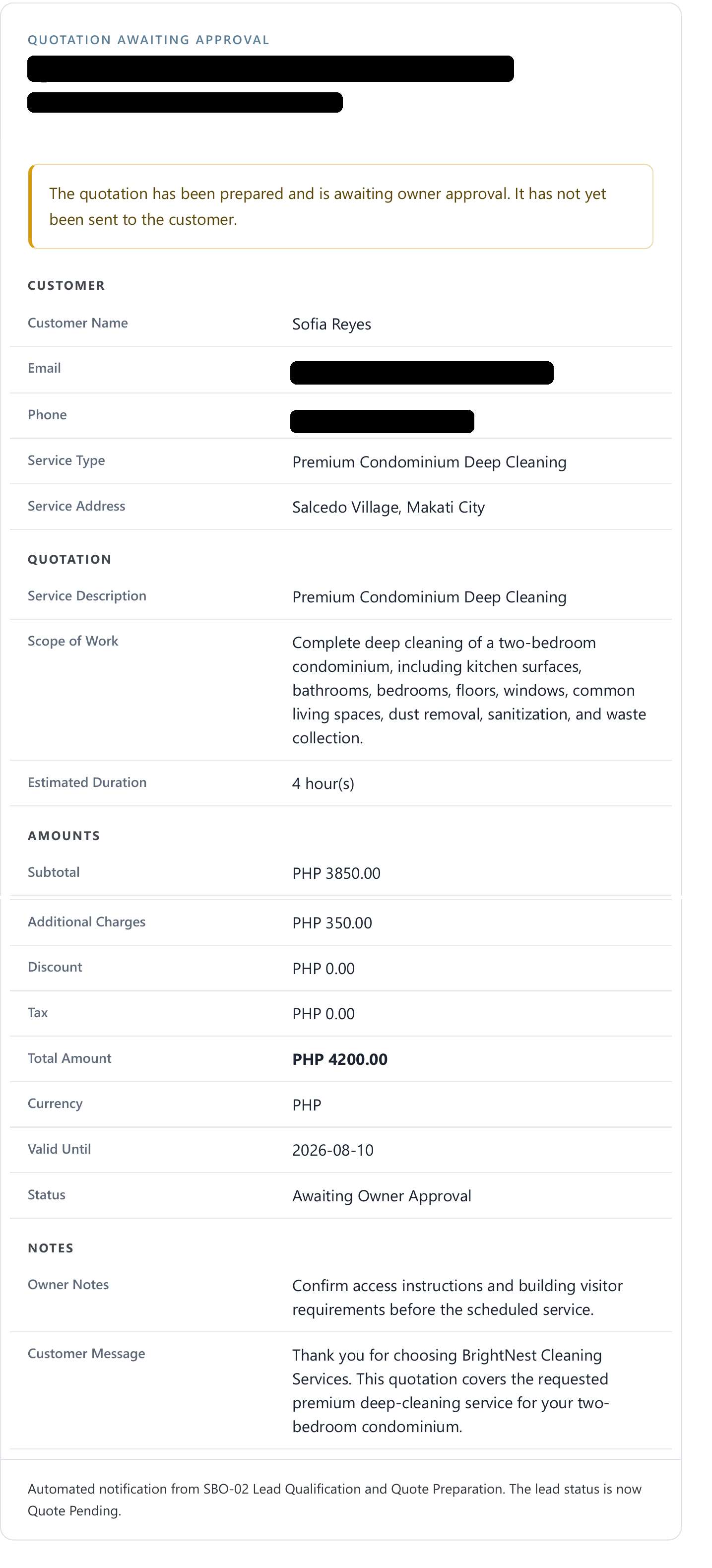
Sanitized quotation review showing a prepared quote awaiting owner approval before customer delivery
Quotation held for owner approvalThe workflow prepares the commercial details but keeps customer delivery behind a human decision gate.Open full-resolution evidence
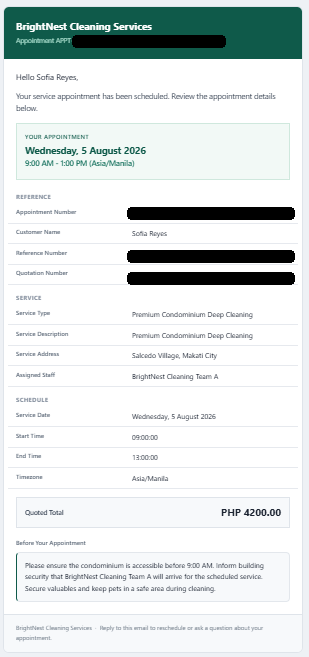
Sanitized appointment confirmation containing service schedule, assigned staff, quoted total, and customer instructions
Appointment confirmedBooking data, schedule, staff assignment, customer instructions, calendar creation, and confirmation stay tied to the same operational record.Open full-resolution evidence
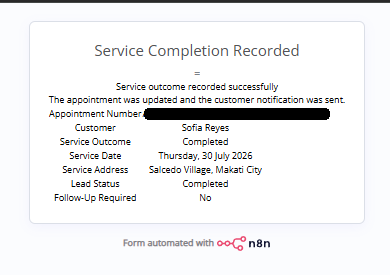
Sanitized form confirmation showing a completed service and updated lead status
Service completion recordedThe completed appointment advances the lead state and creates the basis for invoicing, review collection, and reporting.Open full-resolution evidence
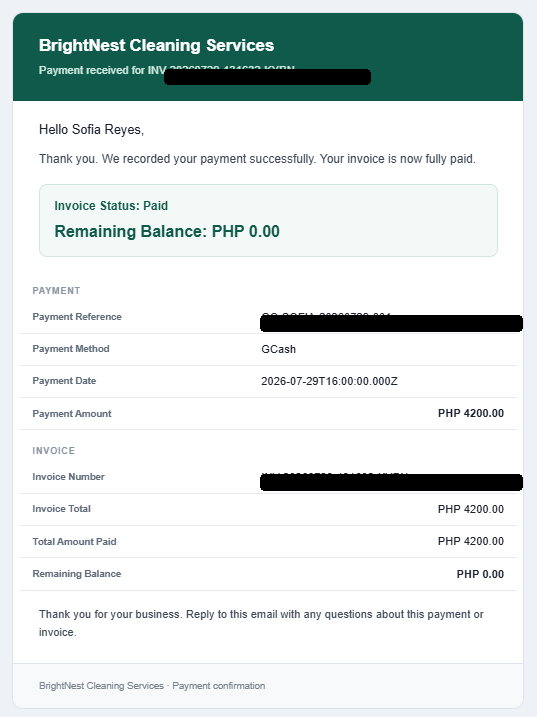
Sanitized payment confirmation showing a paid invoice and zero remaining balance
Payment reconciled with the invoiceThe payment record updates invoice status, amount paid, and remaining balance before a customer-safe confirmation is delivered.Open full-resolution evidence
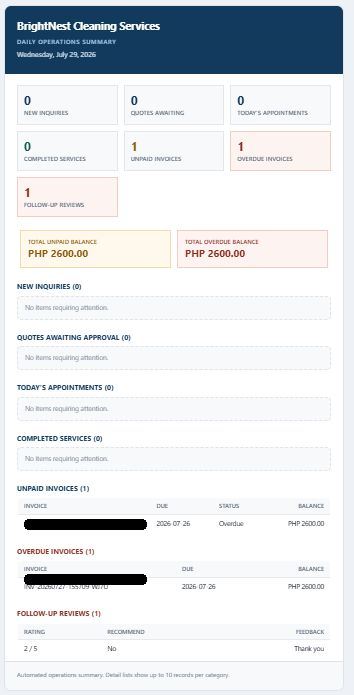
Sanitized owner daily operations summary showing inquiries, quotes, appointments, invoices, overdue balances, and follow-up reviews
Owner visibility in one summaryA scheduled report consolidates current inquiries, approvals, appointments, completed services, unpaid invoices, overdue work, and reviews requiring follow-up.Open full-resolution evidence
05 — Reliability & QA
Operational controls

Reliability is designed into the workflows.

The system validates requests, prevents known duplicate actions, records business state, routes explicit failures, and surfaces incidents instead of letting abnormal conditions remain silent.

01 — Validation

Inputs are checked before state changes

Required fields, linked records, eligible statuses, schedule constraints, payment amounts, and customer email availability are handled through deterministic branches.

02 — Duplicate prevention

Repeat actions are checked explicitly

Existing quotes, review requests, invoices, payment references, reminders, daily summaries, and incidents are checked before new records or notifications are created.

03 — Structured records

Each stage leaves traceable business state

Leads, quotations, appointments, invoices, payments, reminders, reviews, summaries, and incidents are stored as related records.

04 — Failure paths

Operational errors are visible

Workflow operations include dedicated failure outcomes rather than silently continuing after a failed database or delivery step.

05 — Alerts

Owners are notified when attention is required

Owner emails cover quote approvals, low-rating follow-up, overdue activity, daily operations, and automation incidents.

06 — Testing

Normal and abnormal paths were exercised

Validation covered lifecycle updates, reminders, invoice and payment state, failure detection, duplicate incident prevention, and cross-table reconciliation.
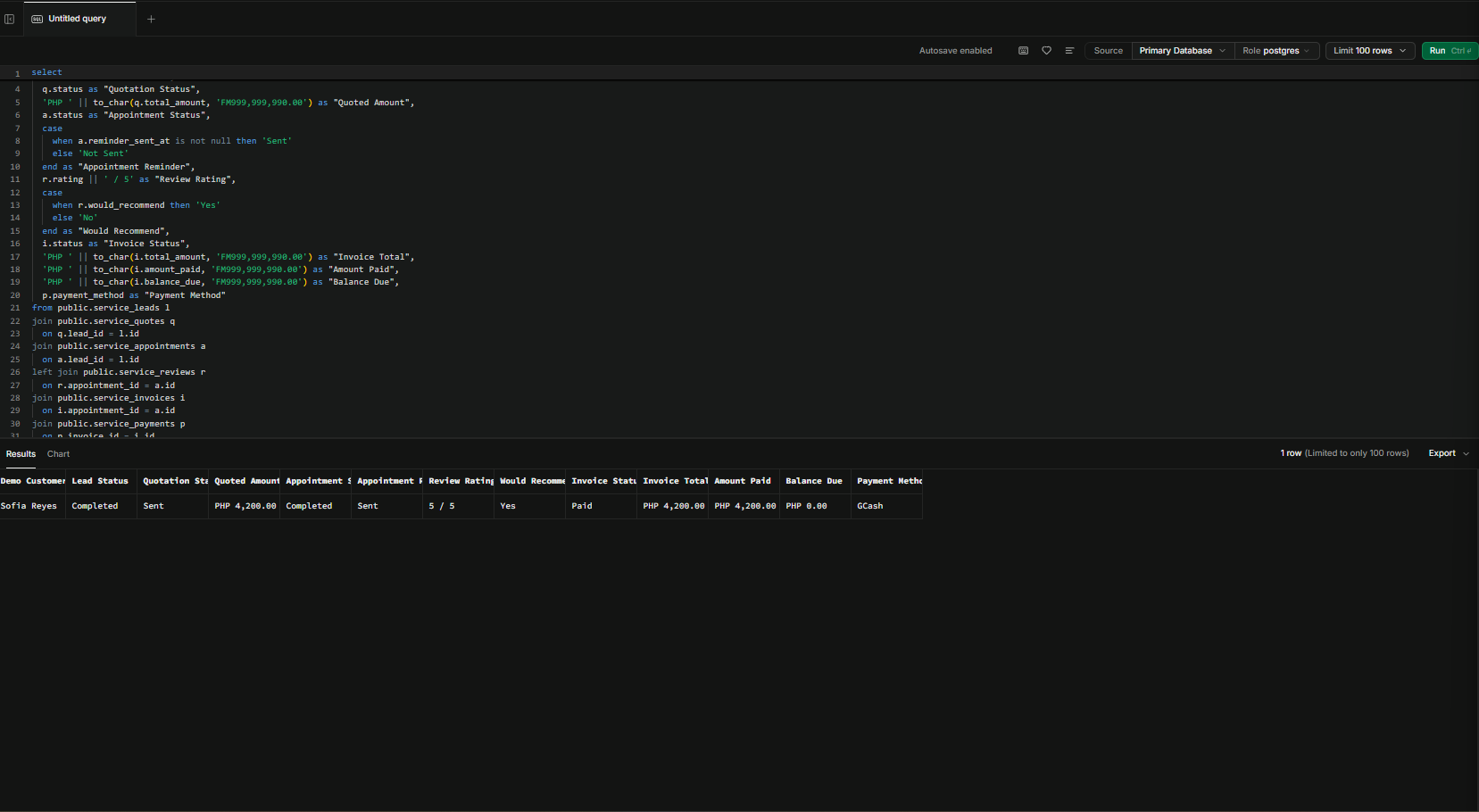
Sanitized database validation query reconciling a demonstration journey across leads, quotes, appointments, reviews, invoices, and payments
End-to-end validation reconciles a single demonstration journey across related operational tables.
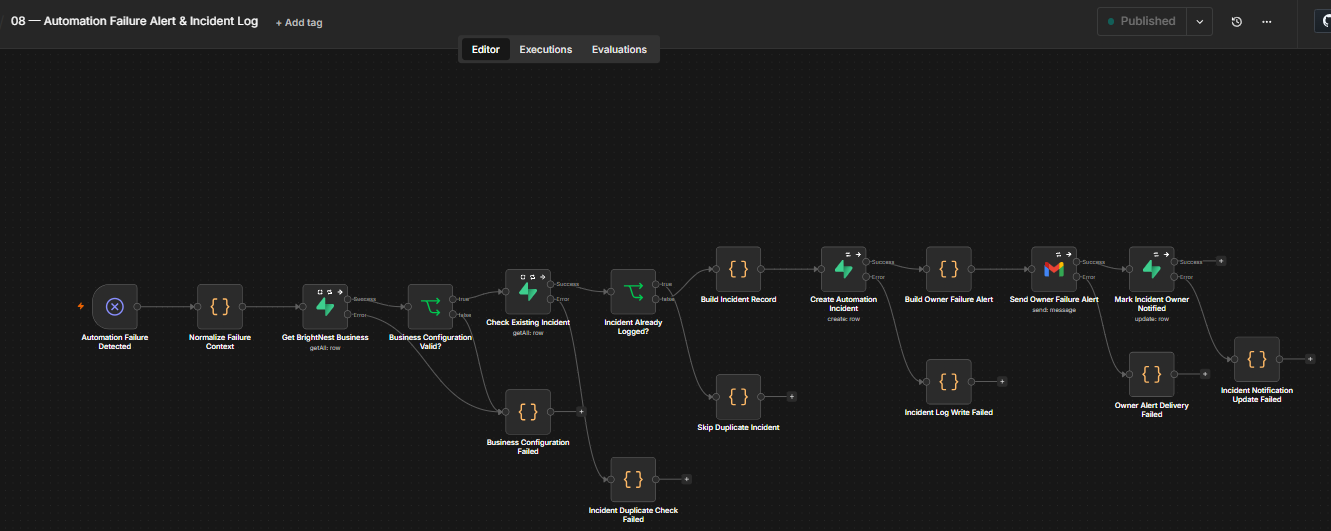
Sanitized n8n workflow for automation failure normalization, duplicate checking, incident recording, owner notification, and delivery tracking
The centralized failure workflow normalizes context, checks duplicates, records the incident, alerts the owner, and tracks notification status.
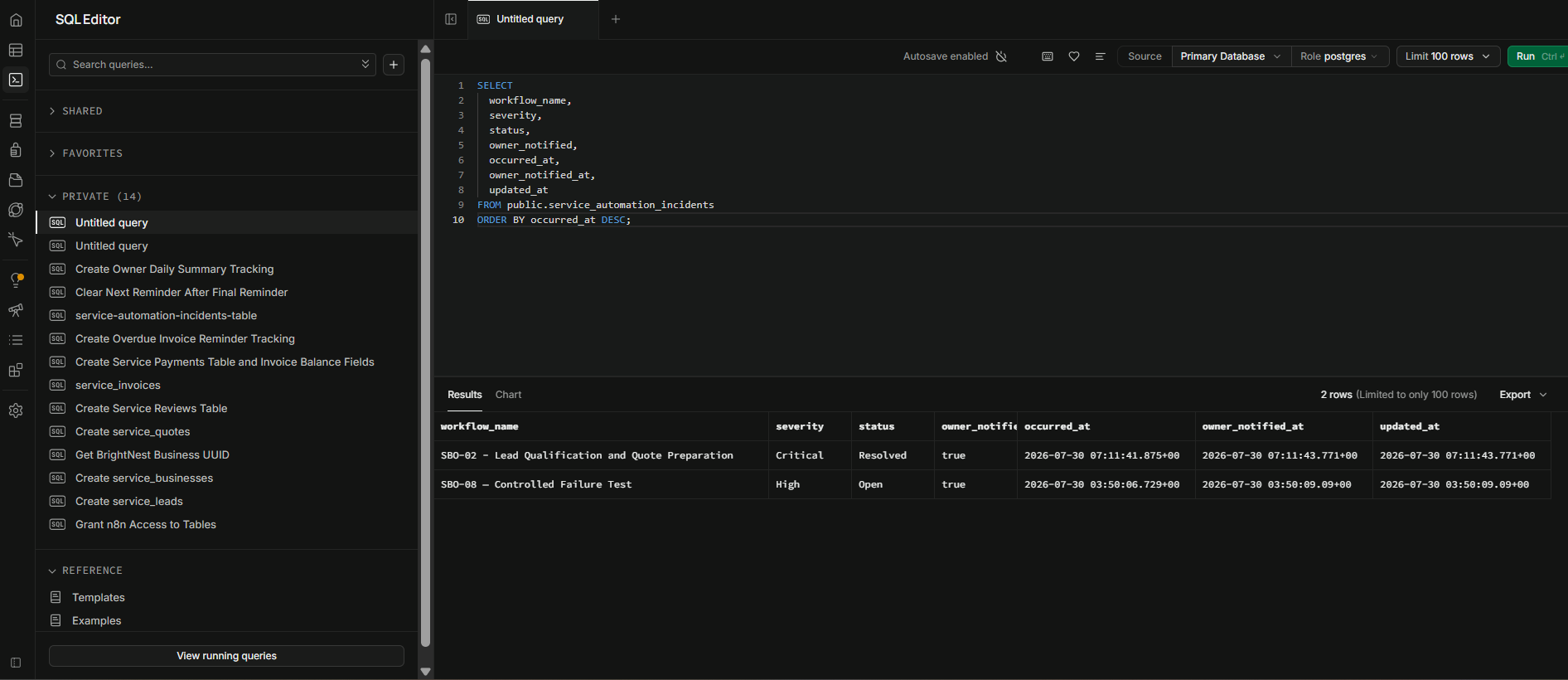
Sanitized incident log validation showing recorded workflow name, severity, status, owner notification, and timestamps
Controlled validation confirmed structured incident records and owner-notification tracking.
06 — Business value

Less repetitive administration. Better operational visibility.

The value is a more consistent operating process: routine transitions move through structured automation while the owner sees the approvals, exceptions, and follow-ups that still require attention.

  • Centralizes customer and operational records
  • Improves quotation and appointment handling
  • Reduces missed reminders and follow-ups
  • Standardizes invoice and payment tracking
  • Improves visibility into overdue accounts
  • Automates review collection and follow-up signals
  • Gives the owner a consolidated daily operating view
  • Detects workflow failures before they remain unnoticed

Automation handles the repetition.
Owners keep the judgment.

Start with the operating process

Is your service business still running through inboxes and spreadsheets?

I can help map the lifecycle, identify repetitive administration, define the approval boundaries, and design the connected system around it.